

Building your first MCP integration
MCP is the standard the integration layer of the AI stack converged on faster than anyone expected. Worth knowing what it actually is before you wire one in.


The Model Context Protocol turned a year old in November 2024, but it's only the last few months, through the open-source server explosion of December and January, and the Claude Code launch in February, that MCP went from "Anthropic's protocol nobody's adopted" to "the integration layer of the AI stack." Cursor, Zed, Continue, Aider all support it. Open-source registries have hundreds of community servers. The shape of "give an LLM access to a tool" has converged on this protocol in a way I would not have predicted a year ago.
Worth being concrete about what MCP actually is, what's good about it, and what it takes to build one, because most of the writing about it so far has been at the layer above what I'd call useful explanation.
What MCP is, minimally
MCP is a JSON-RPC protocol over stdio (or, optionally, server-sent events) for an AI client to discover and call tools provided by a server. Three things matter for the mental model:
- The server provides capabilities. A server can expose tools (functions the model can call), resources (read-only content the model can fetch), and prompts (templated user-facing prompts). Most servers in the wild only do tools.
- The client orchestrates. A client. Claude Desktop, Claude Code, Cursor, Zed, etc., talks to one or more servers, surfaces their capabilities to the model, and routes tool calls back to the right server.
- The model never talks to the server directly. Tool definitions and tool-call results pass through the client. The server doesn't know which model is on the other end and shouldn't care.
That's it. The protocol is small enough that you can read the spec and the reference implementation in an afternoon.
How the pieces fit together
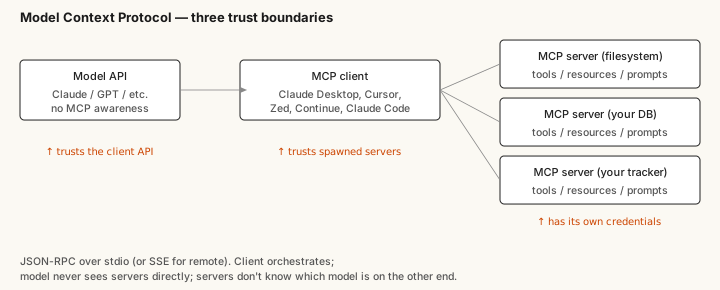
In a typical setup, the client process spawns the server as a child process and communicates over its stdin/stdout. The server's responsibility is to enumerate its tools on request, execute tool calls, and return structured results. The client's responsibility is to expose those tools to the model in whatever shape the model API expects, route the model's tool-call requests to the right server, and return the results in the next turn.
The reason this design has spread is that it's easier to reason about than the alternatives. The server is a normal process with normal access to whatever it needs (filesystem, database, API credentials). The client process trusts the server because it spawned it. The model trusts the client because it's the only API it talks to. Each trust boundary lives at exactly one place, and the protocol doesn't try to be smart about anything beyond moving structured messages.
Building a minimal server, end to end
The shortest path to a real working server is roughly fifty lines of TypeScript or Python. Here's the shape using Anthropic's reference Python SDK; the exact API surface is stable enough at this point that following the SDK docs will get you working code.
A server has:
- An identity, a name and version surfaced via the
initializehandshake. - A tool list, declared via the
list_toolshandler, returning each tool's name, description, and JSON-schema input schema. - A call handler,
call_toolthat takes a tool name and arguments and returns a structured result.
For a first integration, pick a tool that does one useful thing your existing tooling can't do well from inside the AI client. The boring sweet spot is a tool that reads from a system you already have an API for: your project tracker, your time-series database, a documentation site you control, an internal directory. The tools that produce the most value are usually the ones that surface data the model otherwise has no way to see.
Avoid the temptation to make the first tool ambitious. A server that exposes one well-named, well-documented tool that returns clean JSON is far more useful than a server that exposes ten tools the model has to figure out on the fly. The model's tool-selection accuracy degrades fast as the menu grows; pick the one tool that genuinely matters and ship that first.
What "well-named" actually means in practice
The model's selection accuracy for tools depends heavily on names and descriptions. After watching agents pick wrong tools enough times, a few patterns hold:
- Verb-object names read better than noun-only ones.
search_ticketsovertickets.fetch_user_profileoveruser_lookup. - The description should say what the tool returns and when to use it, not how it's implemented. The model isn't choosing based on internals, it's choosing based on what the description promises.
- Avoid overlapping descriptions. If two tools sound like they could do the same thing, the model will pick wrong about half the time. Either merge them or sharpen the descriptions to make them clearly different.
- Make the input schema strict. Optional fields that the model can fill with garbage are how you get unhelpful tool calls. If a field is required for the tool to do anything useful, mark it required. If a field has a small enumerated set of valid values, use an enum.
Following those four rules will make a small MCP server feel substantially better than following the path of least resistance.
What MCP doesn't solve
A few things worth being clear about before wiring in a server:
- Auth is yours. MCP punts on authentication entirely. If your server talks to a system that requires credentials, you're handling them, usually via environment variables read by the server process at startup, sometimes via OAuth flows the user completes once. There's no protocol-level identity.
- Capability discovery is one-way. The model sees the tools the server exposes; the server doesn't see what the model is. That's by design but it's worth knowing, your server can't behave differently for different model classes without extra plumbing the protocol doesn't define.
- Versioning is informal. The spec is still moving, and breaking changes between versions of the SDKs have happened. Pin your dependencies. Watch the spec repo for proposed changes.
- Multi-server orchestration is the client's problem. If you have five MCP servers connected, the client decides how to present that to the model. Most clients flatten everything into one tool list, which works but starts to suffer past a couple dozen tools.
The protocol is small enough that none of these are dealbreakers for a useful integration. They're just the shape of what you're signing up for.
Why this is actually the moment
Two years ago I wrote about ChatGPT plugins being the early signal of agents-with-tools as a category. That signal turned out to be right about the direction and wrong about the protocol, plugins didn't become the standard. MCP did, and it did so over the course of about a year, after sitting in relative obscurity for the first several months of its existence. The thing that flipped it was Cursor and Claude Desktop both shipping client support, then everyone else following because the alternative was being the only IDE without a tool tooling.
The practical implication is that any internal system you maintain (a database, a documentation site, a project tracker, a deployment pipeline) is now a candidate for an MCP server, and once it has one, every MCP-aware AI client your team uses can reach it. That's a much smaller integration surface than it sounds, and the work to set up the first one is small enough that you'll know within an afternoon whether the result is useful for your specific situation.