

The local-LLM home-lab buyer's guide for 2025
What to actually buy if you're starting a home AI setup in mid-2025. Not the maximalist build; the right-size build for the workloads that justify owning the hardware.

The home-AI buyer's question has gotten more specific in 2025. A year ago it was "is this even feasible." Six months ago it was "what hardware roughly fits." Now the right question is "what do I buy if I'm starting today and the workloads are X." Worth being concrete about the answer, because the maximalist takes ("get the biggest Studio you can afford") miss most of the actual buyers, and the minimalist takes ("just use cloud") miss the real workloads where local wins.
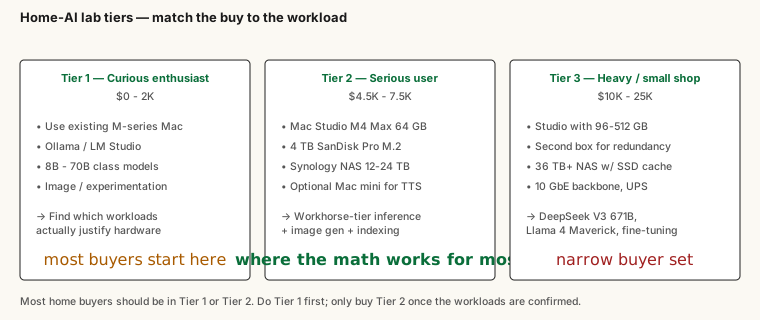
Here's how I'd think about it: workload → hardware tier. Three tiers cover most home buyers in mid-2025.
Tier 1. Curious enthusiast: $0-2K
What you're trying to do: figure out whether running models locally is worth taking seriously.
The right answer: use the Apple Silicon Mac you already own. Install Ollama or LM Studio, download a few models, see what's actually useful for your workloads. Llama 3.3 70B at 4-bit fits in 48 GB of unified memory, which is most current MacBook Pros and Mac Studios you might already have. The smaller models (Llama 3.1 8B, Phi-3, Qwen 2.5 7B) run on essentially anything modern.
Cost: $0 if you have an M-series Mac with 32+ GB. The activation energy is downloading Ollama and running ollama pull llama3.3:70b.
What you find out: which workloads benefit from local inference and which don't. Most people discover the always-on personal-AI assistant is the workload that justifies buying hardware, and that running batch experiments locally costs essentially nothing on top.
If you're shopping rather than using existing hardware: a MacBook Pro M4 Pro with 48 GB unified memory ($2,000-2,500 used) is the smallest reasonable starting point. The unified-memory design beats any consumer-tier discrete GPU for the casual-experimentation case.
Tier 2. Serious local-AI workload: $3-8K
What you're trying to do: run an always-on personal-AI assistant or equivalent, comfortably, with room to experiment.
The right answer in mid-2025: a Mac Studio M4 Max with 64 GB unified memory ($2,500). Add a 4 TB external SanDisk Pro M.2 SSD for fast working storage ($300). A small Synology NAS with 12-24 TB of storage ($1,500-2,500 with disks) for model weights, dataset cache, and backup target. Optional: a Mac mini M4 ($800-1,200) for always-on lighter services like text-to-speech, transcription, OCR.
Cost: $4,500-7,500 depending on options. About what a serious workstation costs.
What this gets you: comfortable inference for the workhorse-tier open-weights models (Llama 3.3 70B, DeepSeek V3 distills, Qwen 2.5 32B), image generation via FLUX, embedding pipelines, light fine-tuning experimentation. Everything that runs comfortably in 64 GB of unified memory.
The setup I run myself sits in this tier, described in the home-setup piece. It's what I'd recommend to anyone who's done Tier 1 and decided the workloads justify owning the hardware.
Tier 3. Heavy local user or small shop: $10-25K
What you're trying to do: run multiple models at once, fine-tune meaningfully, serve a small team, or run the absolute biggest open-weights models locally.
The right answer in mid-2025: a Mac Studio with 96-128 GB unified memory (or the M3 Ultra Studio with 256-512 GB if budget allows). Add a serious NAS (36 TB+ with SSD cache). Add a second box for redundancy or specialty workloads. Add proper networking (10 GbE switching, fast NAS connection). Add a UPS that can handle a sustained outage.
Cost: $10,000-25,000 depending on memory tier and the rest.
What this gets you: ability to run DeepSeek V3 671B at 4-bit, Llama 4 Maverick, Qwen 3 235B, the genuinely large open-weights models. Serious fine-tuning capacity. Concurrent multi-model serving for a small team.
Honest read: most home buyers shouldn't be in this tier. The capability gain over Tier 2 is real but the workloads that justify it are narrow. If you're building a small business around local AI, this is a credible starting point. If you're a single user with daily-AI workloads, Tier 2 covers you and you should spend the $15K saved on something else.
What about NVIDIA?
The NVIDIA path is real and largely unchanged from earlier in the year. A single RTX 4090 (24 GB) handles the 32B-class models well; a 5090 (32 GB) widens the runway. Two-card builds get you serious capacity. The trade-offs versus Apple Silicon: better tokens-per-second on the workloads that fit; worse memory ceiling (you're constrained by the card's VRAM, not by the box's unified memory); more power, more heat, more noise.
The right NVIDIA path for a home buyer in mid-2025: one 5090 in a quiet workstation chassis with good cooling. About $4,000 all-in for the build. Fits the 32B-class workloads comfortably, the 70B-class with aggressive quantization. Doesn't reach Llama 4 Maverick territory. Pairs well with the same NAS-and-networking stack as the Apple-Silicon path.
The case for NVIDIA over Apple Silicon: you're doing CUDA-specific workloads (training, fine-tuning with bigger batches, certain inference frameworks that lean on CUDA), or you already have NVIDIA infrastructure. The case against: power, heat, noise, and the upper memory ceiling.
What about Strix Halo / Ryzen AI Max / etc?
The AMD competitors to Apple Silicon for unified-memory workloads are real and improving. As of mid-2025 the software stack (ROCm) is maturing but still less polished than Apple's MLX or NVIDIA's CUDA. For a buyer today: not yet the right pick over Apple Silicon for most home workloads, but close enough that the situation could change in the next year. Worth watching.
The peripherals nobody talks about
A few things that matter as much as the inference machine and never make it into the buyer's guide.
The NAS. Don't undersize this. Models cache locally; the cache grows; backup matters. A 36 TB+ NAS with proper redundancy and a meaningful SSD cache layer is the difference between "I can keep all the models I want" and "I'm constantly juggling what fits."
The network. 10 GbE between the inference box and the NAS makes model loads fast. Gigabit makes them painful. The cost difference is small; the day-to-day difference is big.
The UPS. A clean shutdown beats a kernel panic. A managed UPS with USB notification to the boxes is $200 well spent.
The portable SSDs. A 4 TB external NVMe drive on the inference machine and another on the laptop changes how comfortable certain workflows are. Two of the same drive on two machines is also the cheapest "I can move the working set between machines" answer.
The ergonomics. Where the boxes physically sit, how loud they are, whether you can ignore them, these matter as much for daily-use sustainability as the spec sheet does.
The honest recommendation
Most home buyers in mid-2025 should be in Tier 1 or Tier 2. Tier 1 if you're not sure the workloads exist; Tier 2 if you've confirmed they do. Tier 3 is for the small subset where the math actually justifies it.
The single best piece of buyer's-guide advice I can give: do Tier 1 first. Use the Mac you already own for a month. Notice which workloads you actually keep coming back to. Then buy the Tier 2 setup if those workloads warrant it.
The pattern that breaks this: people who buy the maximalist build first, then discover the workloads don't materialize the way they hoped, then have an expensive hobby. The pattern that works: small steps matched to actual usage. The Apple Silicon plus open-weights trajectory means the Tier 2 setup keeps getting more capable on the same hardware budget, buying smaller now and upgrading later costs less than over-buying now and not using it.
Halfway through 2025, the home-lab story is more buyable than it's been at any prior point. The pieces fit together cleanly, the self-hosting requirements are well-understood, the pricing tiers are fair. The right buy is the one that matches your actual workloads. Most people's workloads sit at Tier 2.